Vocabulary dictionary

Kanji dictionary

Grammar dictionary

Sentence lookup

test
 

Forums - [Megathread] Blank/Blue/Black screen issue (Android)

Top > renshuu.org > Bugs / Problems


avatar
マイコー
Level: 332

Cause: a recent update to Android System Webview, an app run and updated by Google that is used by many apps, including renshuu, is causing issue to some apps in certain situations.

Temporary Fix 1 (works for some people): Long press the app icon on your phone, then go to Info > Memory/Cache. Clear all of this out (this will not remove any of your account data, just log you out). Open the app again, then log in.

Temporary Fix 2 ("stronger" fix than #1): You'll need to remove the updates to Android System Webview. How to do so:

(layout may vary slightly depending on your Android version).

1. Go to the Phone's Settings

2. Find the Apps section/category

3. Go to "All Apps", then find "Android System Webview" - Tap to view information.

4. Somewhere on that page, you should have an option to "Uninstall updates". For my phone, it was hidden in the vertical ... icon in the top-right. Do that.

5. Run renshuu again.


However, if you are uncomfortable making this change, do know that you can always open up renshuu.org in your browser of choice on your phone, then log into the same account that you use with the renshuu app.

I will be monitoring this, and will update this thread when we believe that the newest version of Webview works with renshuu and other apps.


==== Original post ====

As this is popping up in a number of thread and messages, I'd like to use this to keep all the information in one place.

1. Temporary fix: long press on the app icon. Then go to (wording may be slightly different) "more info" > "data/cache", then clear out all data AND cache. This will not clear out any renshuu data, only log you out. After that, log back in.

2. After doing #1, if it happens again (not earlier, but after reading this post and doing the step above), please report here with the following:
A. Android version
B. renshuu version (it is the bottom-left in renshuu's pop-out menu)
C. What was the thing you were doing in renshuu when it happened.
D. Is there anything else you can do in renshuu via the menu? (Return via the home button, load mail/settings, etc.)?

E. Please go to your Android's settings, then go to the Apps section. Go to where you can see all the apps, then look for one called Android System Webview. tap on that, and let me know what version you have.


6
6 days ago
avatar
anna_enko
Level: 574

Android 16, Samsung OneUI 8.0

Renshuu 1.2.20260311

Anything goes really. One thing that triggers the issue is switching to app drawer or another app. Sometimes opening the dictionary gives a blank window. Opening the forum can do that too. Doesn't seem that it's any specific activity.

Right now I can see hamburger menu, 'return to quiz' button, question mark button, home button and the dictionary button. The rest is blue. Pressing the home button works as intended. Sometimes scrolling the page up and down refreshes it, sometimes not.

I have developer mode and USB debugging on, connected with `adb devices` listing the phone. I can see it connected via chrome://inspect/devices. I opened the console, but it's blank. How do I capture output from the renshuu app? Haven't done this kinda thing before.

1
6 days ago
avatar
マイコー
Level: 332
Thanks. I updated the first post. Please look at E:

E. Please go to your Android's settings, then go to the Apps section. Go
to where you can see all the apps, then look for one called Android
System Webview. tap on that, and let me know what version you have.
0
6 days ago
avatar
anna_enko
Level: 574

148.0.7778.120

0
6 days ago
avatar
マイコー
Level: 332

Thanks. I do not have any proof yet, but strongly suspect a recent Webview update by Google is causing the issue. I cannot replicate it on my device yet. I cannot take responsibility for this, but for those who are comfortable with this, installing an earlier version (maybe 2-3 weeks ago) of Android System Webview would be a good thing to test. There are numerous sites such as apkmirror.com where you can download previous versions of apps.

2
6 days ago
avatar
anna_enko
Level: 574

I have an 'uninstall updates' button on webview app, will try doing that and running renshuu. It rolled me back to 134.0.6998.135. I'll report back.

0
6 days ago
avatar
クリス~エム
Level: 162
anna_enko (0514, 21:51)

I have an 'uninstall updates' button on webview app, will try doing that and running renshuu. It rolled me back to 134.0.6998.135. I'll report back.

​I originally had 147.0.7727.137 with the issue. Rolling back to the stock on my device put me at 126.0.6478.71 and I couldn't reproduce the issue.

Then I downloaded the Dev version from the Play Store, version 150.0.7828.3 and haven't been able to reproduce it either. Hopefully that means a fix is in the pipeline from Google.

I saw the Beta version is at 149.0.7827.13 but I didn't try it. Both the Beta and Dev versions say they are updated weekly. There's also a Canary version for a daily build.

Annoyingly the Play Store doesn't flag there's an update to the "normal" version for me to re-test version 147 that I had. Maybe it will appear later.

3
6 days ago
avatar
anna_enko
Level: 574

Nice! I'm not observing any issues on the older version either, so it does seem like there was a buggy release. Fingers crossed we get a fix soon 🤞

1
6 days ago
avatar

The problem still occurs on WebView Dev 150.0.7838.2.

Uninstalling and reverting to 131.0.6778.260.

0
5 days ago
avatar
マイコー
Level: 332

This is wonderful news (in a sense) - it provides a temporary fix that I can offer to others until the actual issue is fixed.

0
5 days ago
avatar
マイコー (0515, 1:37)

This is wonderful news (in a sense) - it provides a temporary fix that I can offer to others until the actual issue is fixed.

​What I meant is, the solution proposed by クリス~エム does NOT work. What works is uninstalling updates from Android WebView.

I was able to confirm that the version 146.0.7668.0 of Android WebView Dev (available on APKMirror) works without issues.

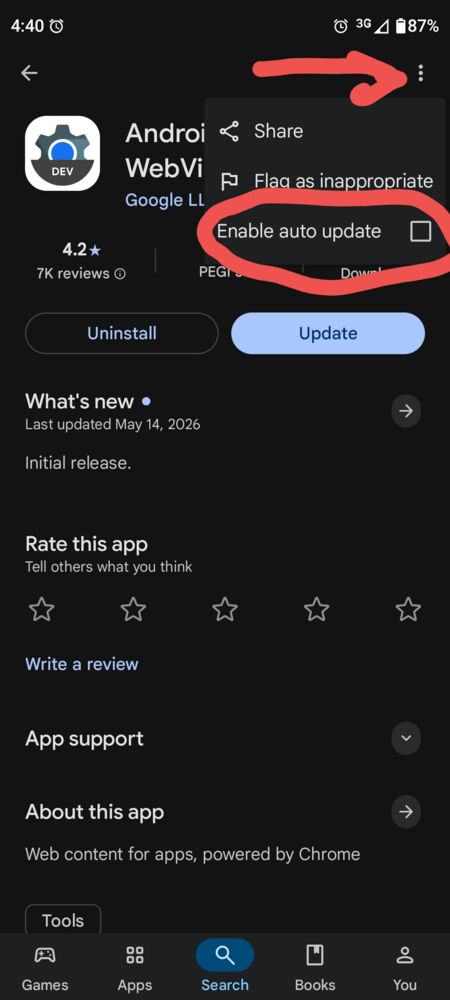
You can install it alongside the stock version and set it as default in Developer Options. Make sure, however, to uncheck 'Enable auto update' on the app's page in Google Play Store, so that it doesn't get overwritten.


462697f877a6cdaa92aab946.png
3
5 days ago
avatar
クリス~エム
Level: 162

Turns out my phone was still using the older version even while I had the Dev version installed. Disabling the old stock version forced it to use Dev and the problem does persist.

I'm now running just on the old version.

1
5 days ago
avatar
anna_enko
Level: 574

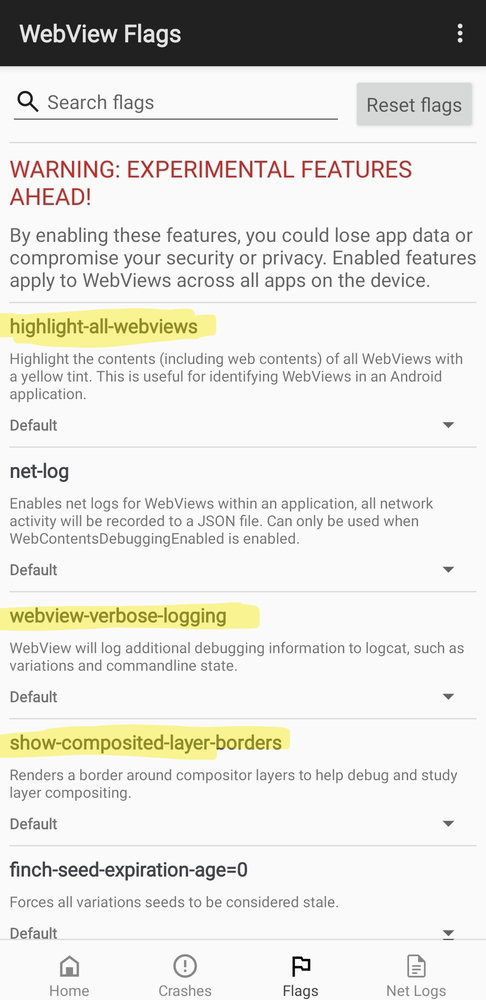
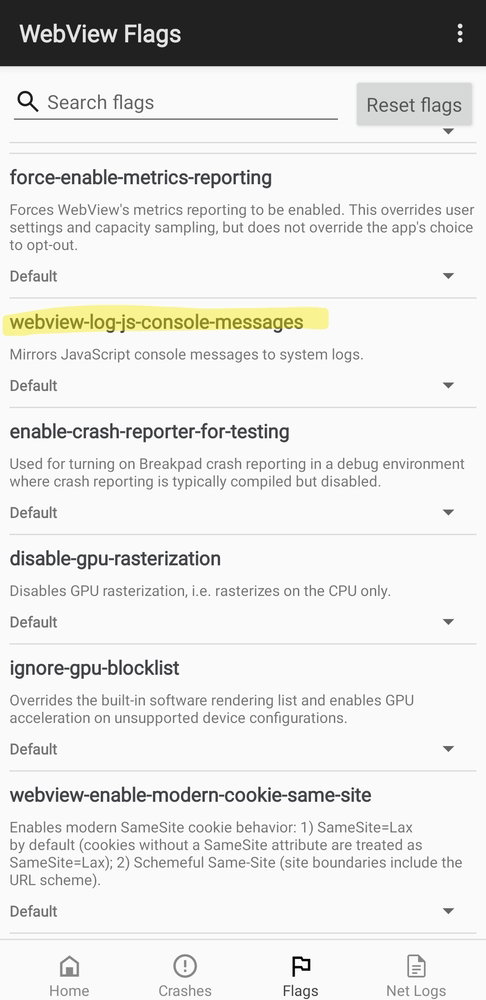
Do we still want to try to debug more? There are some options described here, maybe logging webview stuff to logcat could be interesting https://chromium.googlesource....

Other than that Michael could consider filing a bug, but they might want a minimally reproducible example https://issues.chromium.org/is...

I haven't found an open bug that matches the description of what we're experiencing.

0
5 days ago
avatar
anna_enko
Level: 574
70aeedccd89b05690fe1bd9e.jpgcb8416fced1a22a80df3c429.jpg

these options look like they could be helpful for debugging

0
5 days ago
avatar
マイコー
Level: 332

This appears to be either the same bug or a related one.

https://issues.chromium.org/is...

I would be absolutely thrilled to have you or someone else who can reproduce the bug post in a new thread on the chromium bug tracker - I'd do it myself if I was experiencing the issue :(

0
4 days ago
avatar
anna_enko
Level: 574

That bug is reporting the version which works well for me with renshuu, 134.0.6998.135.

I can post with zip and recording, but I obviously can't do a sample minimal app. I'll try to file a bug tomorrow.

0
3 days ago
avatar

マイコー,

I've been trying to debug the app through Android's USB Debugging in tandem with chrome://inspect, unfortunately to no avail.
It allowed me to inspect pages from my phone's browser on desktop, but it didn't detect any input from the Renshuu app.

I am no programmer, but apparently there's a way to enable WebView debugging by setting the "setWebContentsDebuggingEnabled" method to "true". Would you consider realeasing a build with WebView debugging enabled? Unless it poses a security risk, of course.

0
3 days ago
avatar
マイコー
Level: 332

It is set up to only allow that in the debug version of the app (when I am developing it on my end). At this point, though, I do not believe it will show anything, as I do not think it has anything to do with dom elements, assets, etc., but the entire webview just going kaput.

0
3 days ago
avatar

For the past few days I've been seeing a black screen issue consistently during vocabulary quizzes, particularly on getting a listening question wrong - I've had to go to the home screen then return to quiz to continue. Webview version is 148.0.7778.120.

Uninstalling updates on Android Webview fixed it for me.

Other possibly relevant clues: I'm on Android 14, I'm using custom keyboards (Unexpected and Sumire), and it's happening on wifi and 4g. From what I can tell the content is present in the webview, it's just not being rendered; when I did the workaround of navigating to home, the content appeared briefly before the new page loaded.


0
1 day ago
Getting the posts


Top > renshuu.org > Bugs / Problems


Loading the list
Lv.

Sorry, there was an error on renshuu! If it's OK, please describe what you were doing. This will help us fix the issue.

Characters to show:


Use your mouse or finger to write characters in the box.
■ Katakana ■ Hiragana