I've been having this issue for about a week, and I thought it would solve itself, but sadly it hasn't so far.
not sure if anyone else also has this issue, if they have a quick fix for it that would be great too
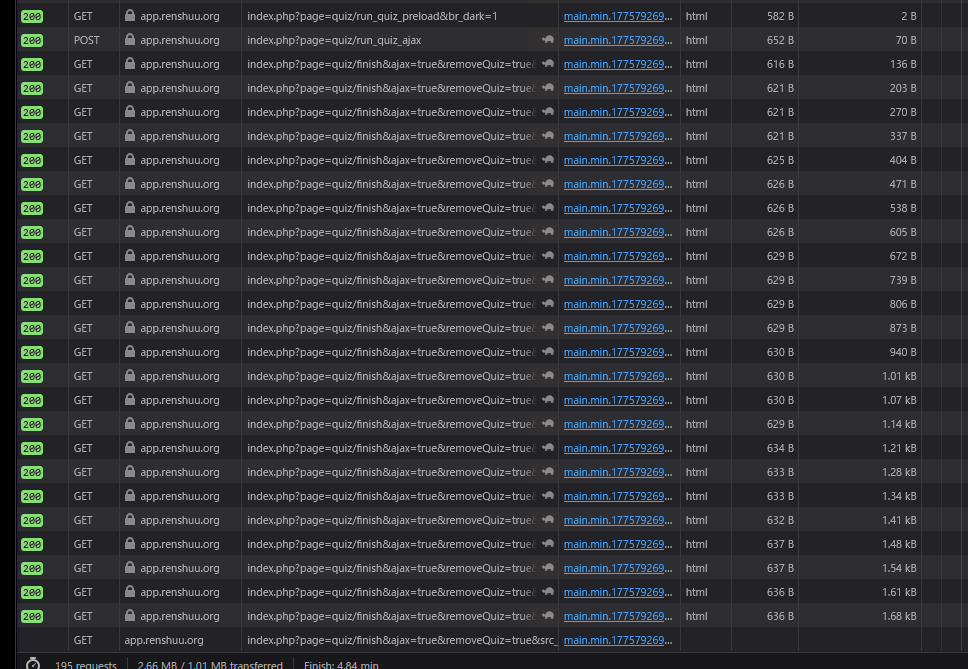
Every time I finish a quiz, it wants to send me to the quiz results screen (which I want that too), but it never does and keeps looping and appending more (of the exact same, so it's just copy pasting them to the end of the url forever) search params to the url. I opened the network tab and all it is doing is sending a request to index.php?page=quiz/finish, and it responds with a redirect with the same link except with more search params.
I'm not sure if this is also related, but all requests to renshuu have been slower, I usually get feedback on a quiz answer in about .2 seconds, but now they've become about 2.2ish seconds, as well as some failing requests to search up words in the dictionary (I have to research it most times), and starting a quiz for the first time says that it's not a valid quiz (where again I have to restart it).
i've attached the infinite loop requests here too, and please let me know if you need any more steps to reproduce or and more information or whatnot
Not sure if there is something that I need to do on my end in order to fix these but I haven't touched my settings in a while nor done anything different on renshuu for a little bit
The reason for this is an unannounced change that I am working on finalizing.
You have a schedule with over 50,000 terms in it - it is one of only about 20 schedules in the entirety of the renshuu system (of millions of schedules). While renshuu was partially able to handle these in the past, they have unfortunately become a resource issue (not the storage, but the processing of them) that slows down the server for not just the users with those schedules, but other users as well.
I need to work in a better system to warn them when this happens, but due to the small number of schedules like that in existence, I put a temporary limit on them (and due to the quick creation of this limit, it's causing a few adverse effects, like what you're seeing here).
I've gone ahead and pushed the limit up to 60,000.
I'd strongly recommend you use the Tools > Advanced Search to split the schedule into two, as the limit will most likely come back into place later on.
Ideally, I would be able to handle schedules of any size, but I unfortunately do not have the time at the moment to try and optimize the system for schedules that represent less than .01% of the total (or active) schedules out there.
After reading this, I went to check on my all-in-one vocabulary schedule, and realized that’s its up to almost 35,000 terms. Is that causing performance issues? If I split it up, what would be a reasonable target size?
oh my god I never thought my 51k work all schedule would cause so much havoc
I'll keep my schedules to a max of 40k from now on just in case the limit gets lowered again
I had my all schedule to see what overall from all my schedules how many words I have to study/are ready to study, although for a couple of years now, it's been unmaintainable so it grows ever larger in the all schedule
50k wasn't a huge issue, but I figured it'd be better to still a bit lower than the max, just to be safe. I hope I can remove that limit in the future!