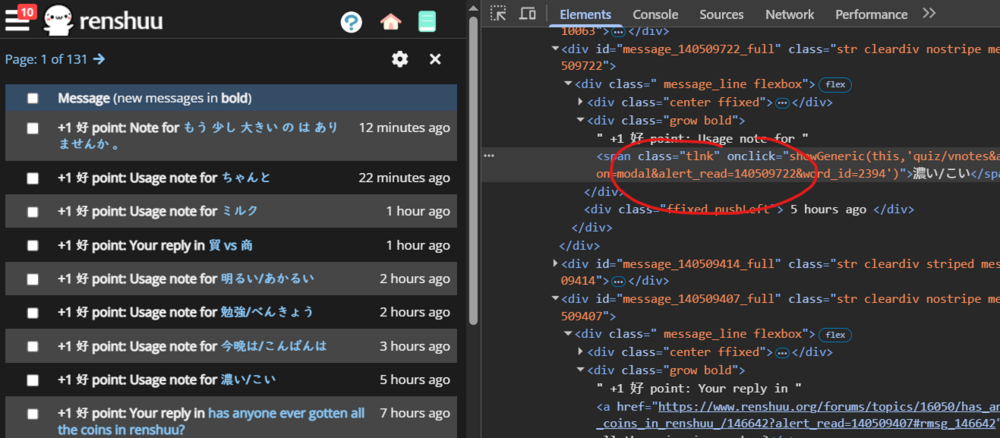
Whenever I go to my messages and press on the point notifications it directs me to the message I received the point but it still shows up as unread in the mailbox and doesn't read it as read unless I manually select it and put it as read. I would also like to clarify that it only does it with the points not the replys. Is anyone having a similar issue?
It’s been a while since I disabled すき-point notifications, but I think it may have always behaved that way.
no for me before when I clicked it it marked it as read but now it still keeps te text bold as if I didn't just click it, I'm mainly addressing the because then I get confused if there's a new message or not I the red dot is always there
(When I say "好 point notifications" I mean the number top-right on the inbox icon)
For me, 好 point notifications for Usage notes and Notes never get cleared automatically. Neither does the bold text (unread status).
好 point notifications for replies (including unread status) do get cleared after I've "opened" them (clicked the link). Mailbox has to refresh (close > reopen), but that's normal. I guess you could make them clear dynamically, but why bother.
I don't mind this at all, just confirming that this is the intended behaviour. I don't think I have the bug OP is describing.
Edit: I guess it's not intended, given that you have "alert_read" there.
Actually i just doubled checked and it only does it for the forum I just made "Any photographers >:) (Renshuu's Community Gallery)" I don't exactly know how to take a screenshot that will show you the problem