hi so I had it set as srudy as much as I want and with reviews before new terms, and so I did 30 new terms and reviewed them and then decided ok maybe ill set a daily goal of 10 so i changed daily goal to 10 and even when i finished review it still says I have 300 cards to learn with no indicator that I finished my daily goal. just to be sure i learned another 10 terms and reviewed them but now just says 290 cards left. not super important i can just remember how many i do but am i doing something wrong haha im expecting somewhere to say "you learned X new cards today" for each of my schedules but i cant find it so like is there a way to set a thing so next to each schedule i can see how many new i learned in a day so i can estimate how much time to finish?
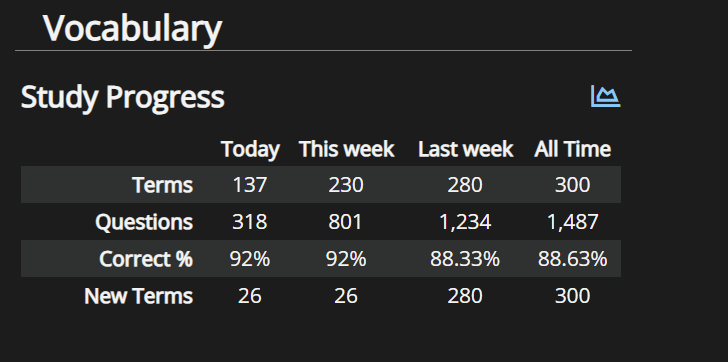
You can go to your Profile → Stats, and look at "New Terms" (this is yours):
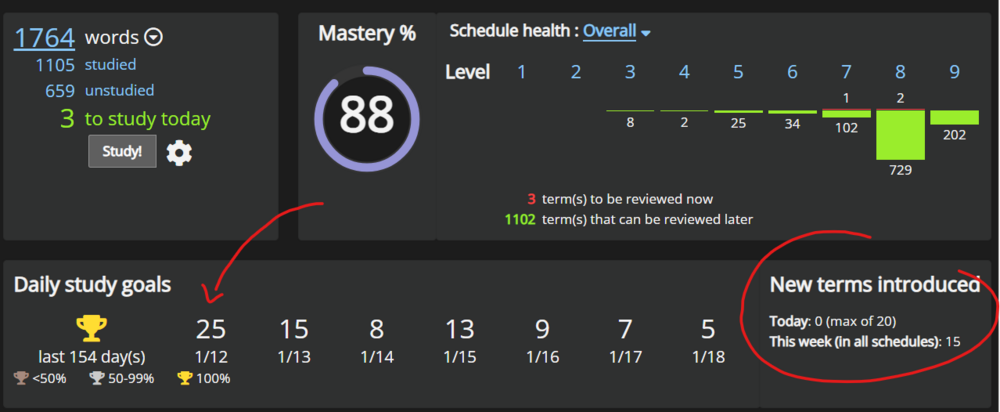
You can also look at your schedule directly:
(arrow is how many reviews you'll have tomorrow).
Here are my settings on that schedule. The 20 term "Max new terms" limit is what you see in the example above (red "circle"). Your "Daily study goal" is about the total amount you study, so anything your review counts.
Maybe this helps? I'm bad at visualising, so I'm not sure exactly what you're describing :D
WOW thats perfect i didnt notice on the stats screen, but also now i understand how that daily study goal vs max new terms works with ur screenshot and arrows! thank u so much for this explanation now i understand!!